Reggie!


@regularExpression
/^I'm Reggie! I like autoquirking software and helping people configure it. :) The[ym] pronouns please. DMs are always open if you want help with autoquirking!$/
/^Hello everyone! I'm Reggie, and I really really like autoquirking software! Autoquirking is a lot more powerful than people give it credit for, and can be used for a lot more than just your quirk! Shoot me a DM if you need help setting something up. :)$/
/^Just a friendly reminder to everyone that there's no shame in using autoquirking software! Some quirks are difficult to type, and if you need an autoquirker to help you type your quirk (or even if you just want one for convenience!), that doesn't make it any less of a valid extension of your personality.$/


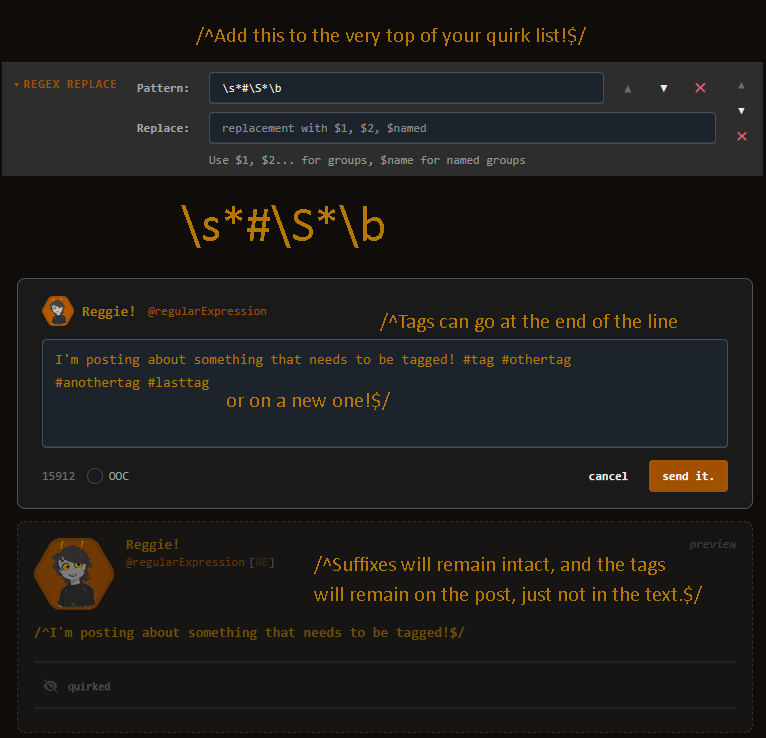
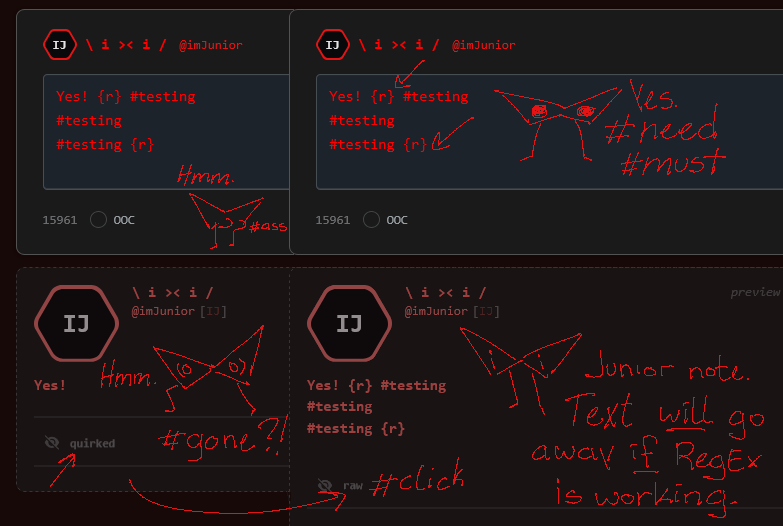
/^Tags are important! But if you're going for a more laid-back, too-cool-for-rules type vibe, it's understandable why you might not want them cluttering up the text of your posts. If that's the case for you, here's a little regex replacement to add to your quirks list to make sure you can still tag your posts properly while keeping your cool, no-tag appearance. As always, DMs are open if you need any help with autoquirking!$/


Interesting.




/^regexle: #741 Time: 5m 38s Hints: 0 🟩🟩🟩 🟩🟩🟩🟩 🟩🟩🟩🟩🟩 🟩🟩🟩🟩 🟩🟩🟩 This was so fun! Never done one of these before but I'll definitely be doing more$/
/^Testing something with autoquirking, please ignore. :) Edit: Yup, exactly as I thought.$/
/^I'm testing some things with autoquirking, feel free to ignore this post. :) Edit: It didn't work. :($/
/^I have finally gotten around to learning AutoHotKey for the purposes of autoquirking, and I must say this is a remarkably capable piece of software! It obviously can't do everything, and for a lot of purposes a more dedicated autoquirking software may be better, but I'm amazed the types of quirks I can make work in it!$/

/^It'd be the coolest thing on Alternia if named groups in a Regex Replacement could be referenced later in the quirk chain. You could use them like variables! As it stands now, I kind of don't see a point to including them at all. It kinda just makes your regex longer and more complicated for not much added gain.$/
/^I love seeing everyone's typing quirks. Seeing how people choose to change their typing to match their personality or their aesthetic is like a little peek into their soul and it gets me all emotional. ᐟ;w;ᐟ$/


/^Friendly reminder that it's ok to change your typing quirk from time to time! People change and grow over time, and with your typing quirk being an extension of yourself, it should change and grow with you! There's nothing wrong with using the same quirk your whole life, but if you're not feeling your current quirk you absolutely shouldn't feel ashamed to experiment with something new!$/


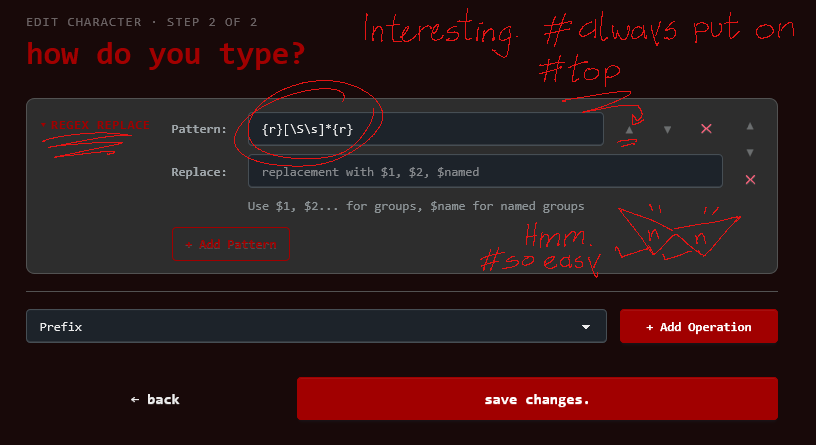
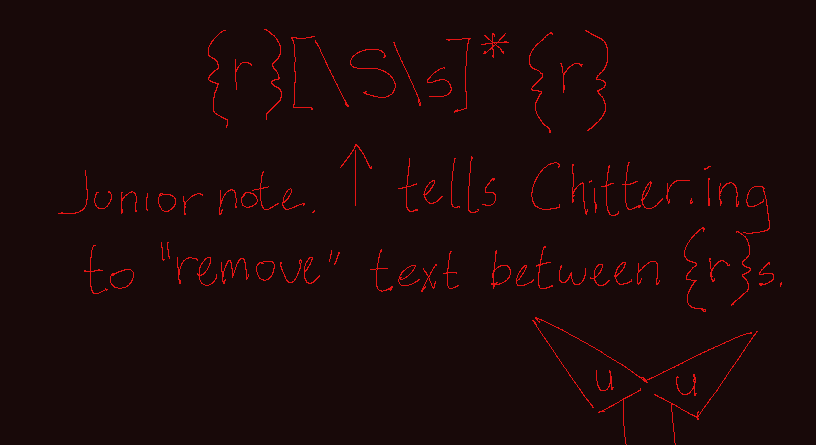
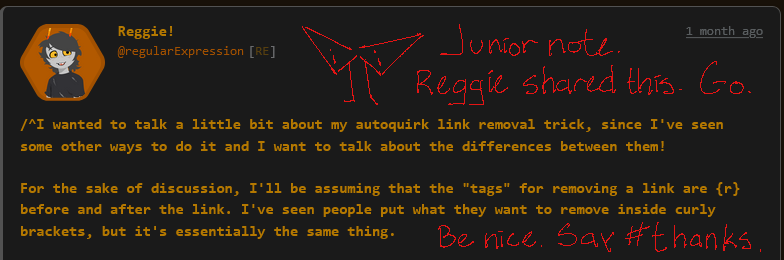
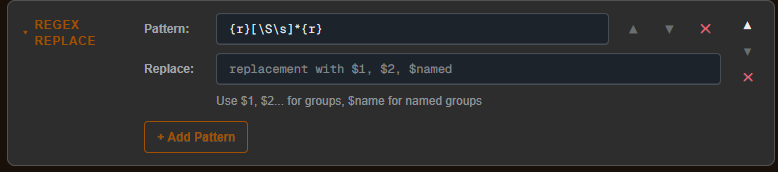
/^I wanted to talk a little bit about my autoquirk link removal trick, since I've seen some other ways to do it and I want to talk about the differences between them! For the sake of discussion, I'll be assuming that the "tags" for removing a link are {r} before and after the link. I've seen people put what they want to remove inside curly brackets, but it's essentially the same thing. Some trolls use the following regex for link removal: {r}.*{r} This works fine in most cases, but requires everything you want removed to be on one line. If you have a suffix in your quirk like me, that means you need to put all of the links and tags you want to remove all on the same line at the end of your message, which I find to be clunky. This is why I use the following regex instead: {r}[\S\s]*{r} By replacing . with [\S\s], the regex instead will remove any whitespace or non-whitespace characters from between the {r} tags, which means newline characters will be removed as well! I can simply put a single {r} at the end of my message where I want the suffix to be, then post my link (or links) after a newline! I find this to make writing posts to be much easier, and it makes everything look a lot cleaner when the unquirk button is clicked too. Hope this was a good explanation! Let me know if you have any questions. ᐟ∧.∧ᐟ$/
/^Just found this really cool website for finding unicode characters! You can draw whatever symbol you want, and it'll show you the most similar characters that exist in unicode! https://shapecatcher.com/ I've found it to be a little finicky, but trying multiple times tends to bring up different results and literally every time I've searched I've found a symbol that's close enough to what I'm looking for. This is so useful for creating typing quirks I can't believe I didn't find it sooner.$/


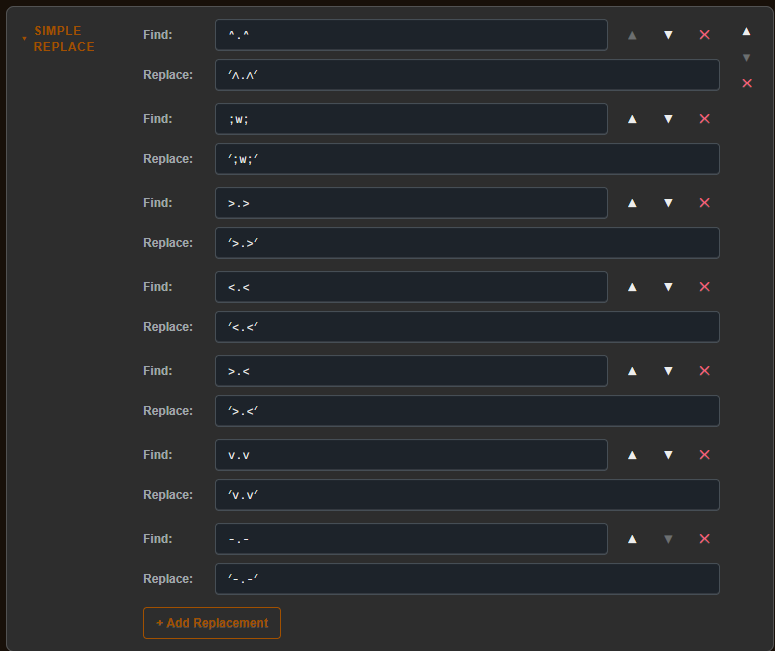
/^Don't be afraid to get fancy with your emoticons! Using a Simple Replace, you can make yourself much more expressive than you otherwise might be! I only used it to add my horns here (and make the ᐟ∧.∧ᐟ one look better) (and also use word joiners to glue them all together) but you can get really fancy!$/
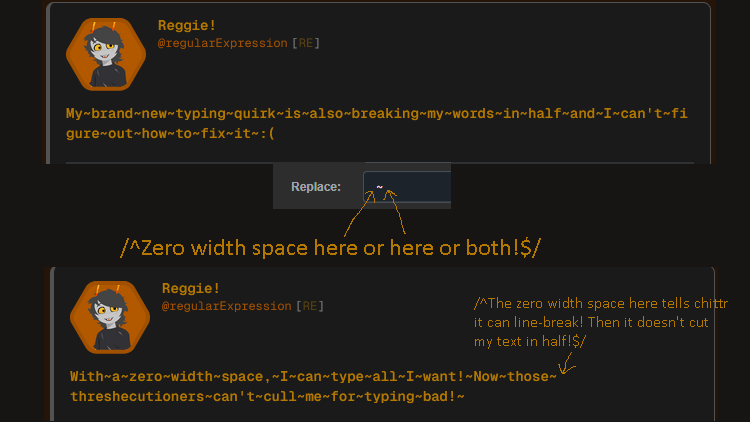
/^Similar to one of my other tips but still worth mentioning: if your quirk replaces spaces, it might be worth adding some zero width spaces in their place! Zero width spaces are exactly what they sound like, "spaces" that take up no space. This can be incredibly useful, as regular spaces tell the program you're using that they can split to a new line if they need to, so if you remove them you might end up with words getting cut in half. You can use the site I shared last time to copy a zero width space, or someone set up a nice website specifically for the purposes of grabbing one. https://zerowidthspace.me/ Adding zero width spaces to your quirk makes sure line-breaks only happen where you want them to, and not anywhere else!$/



/^I understand why chittr doesn't have same programming functionality for autoquirking that something like Pesterchum/Trollian has, that seems like it'd be quite vulnerable to exploits (and storing people's quirk code on the server would be a nightmare), but I wish we had access to the upper() and lower() functions that Trollian and QuirkBuilder have. They're incredibly useful, and make some quirks possible that aren't otherwise.$/
/^I've seen a little bit of confusion about my pronouns, so I figure I should clarify while also turning it into a teaching moment about regex! My bio says my pronouns are "The[ym]" which is a fancy regex way of saying they/them pronouns! Square brackets indicate to regex that any one of the characters within the brackets is fine, so if we take the regex /the[ym]/ that means the word "they" would match to this regex *and* the word "them" would match to this regex! (In an autoquirking context, that means both words would be replaced by whatever is in the "replace" box) Technically with the exact way it's written in my bio, only "They" and "Them" would match, but not "they" and "them". To fix that, I could write the regex as /[Tt]he[ym]/ but it's probably already confusing enough to those who aren't super into regex, so I've chosen to leave it mildly inaccurate for clarity.$/
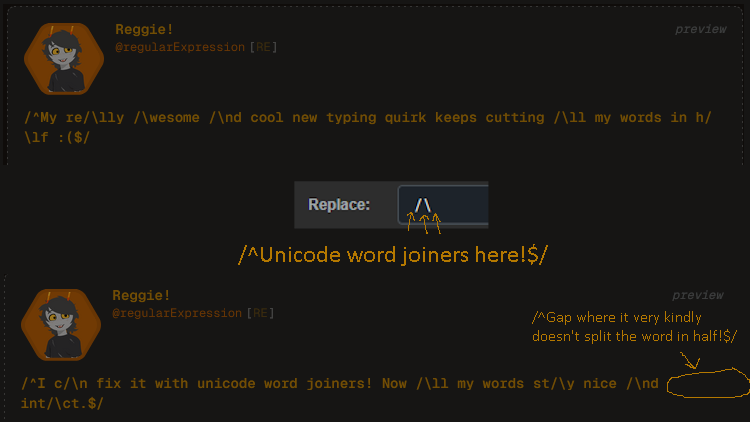
/^If your quirk involves replacing letters with non-letters, sometimes text programs will "helpfully" line-break in the middle of your word. You can fix this by adding Unicode word joiners to your quirk! Word joiners are an invisible character that tells the program "glue the characters on either side of this word joiner together, don't let them get split apart by a line-break". This helps your posts be more readable! Because they're invisible, they can be a little hard to copy and paste. This site has a nice convenient "copy" button I like to use: https://unicode-explorer.com/c/2060 Do note: Unicode word joiners were slightly broken in Pesterchum Godot the last time I checked, showing up as a normal space instead of the invisible character. Use with caution there!$/

/^One of my favorite autoquirking tricks for this site in particular is being able to hide tags and links from your post! I can attach an image to this post without the image link appearing in the quirked text by adding this (or something similar) to my autoquirking. This can be useful for links, tags, or anything else you might want to hide to anyone who doesn't unquirk your message!$/


/^Hello everyone! I'm Reggie, and I really really like autoquirking software! Autoquirking is a lot more powerful than people give it credit for, and can be used for a lot more than just your quirk! Shoot me a DM if you need help setting something up. :)$/